Stay informed
Subscribe to our newsletter if you'd like to stay informed about Shoutem Extensions and Shoutem UI Toolkit.
React Native暴露了你可以使用的普通组件,但是为了使他们看起来更加专业,通常还有很多工作要做。 使用Shoutem UI框架, 一组用于在React Native中构建专业UI/UX的3个软件包: - @shoutem/ui - @shoutem/theme - @shoutem/animation
我们将使用@shoutem/ui,包含可以在任何React Native应用程序中使用的样式化UI组件。
它基本上将任何普通的应用变成一个惊人的应用。 有很多组件,你可以使用开箱即用。
所有组件的文档可以在这里中找到。
让我们添加静态restaurants,并在列表中显示。 首先从工具包导入UI组件。
#file: app/screens/RestaurantsList.js
import React, {
  Component
} from 'react';
import {
  Image,
  ListView,
  Tile,
  Title,
  Subtitle,
  Overlay,
  Screen
} from '@shoutem/ui';
import { NavigationBar } from '@shoutem/ui/navigation';
我们为您准备了一些数据。
创建app/assets文件夹,保存扩展的应用程序部分的资源,并提取这个JSON文件,其中包含restaurants数据。
在RestaurantsList类中定义一个返回restaurants数组的方法。
#file: app/screens/RestaurantsList.js
export default class RestaurantsList extends Component {

  getRestaurants() {
    return require('../assets/restaurants.json');
  }
实现使用ListView的render方法。
ListView接受以数组形式显示在列表中的数据和renderRow方法,它定义了列表行的外观。
添加renderRow方法并替换render方法的实现:
#file: app/screens/RestaurantsList.js
  getRestaurants() {...}

  renderRow(restaurant) {
    return (
      <Image styleName="large-banner" source={{ uri: restaurant.image &&
        restaurant.image.url ? restaurant.image.url : undefined  }}>
        <Tile>
          <Title>{restaurant.name}</Title>
          <Subtitle>{restaurant.address}</Subtitle>
        </Tile>
      </Image>
    );
  }

  render() {
    return (
      <Screen>
        <NavigationBar title="RESTAURANTS" />
        <ListView
          data={this.getRestaurants()}
          renderRow={restaurant => this.renderRow(restaurant)}
        />
      </Screen>
    );
  }
上传扩展:
$ shoutem push
Uploading `Restaurants` extension to Shoutem...
Success!
RestaurantsList现在已经显示了restaurants的列表。
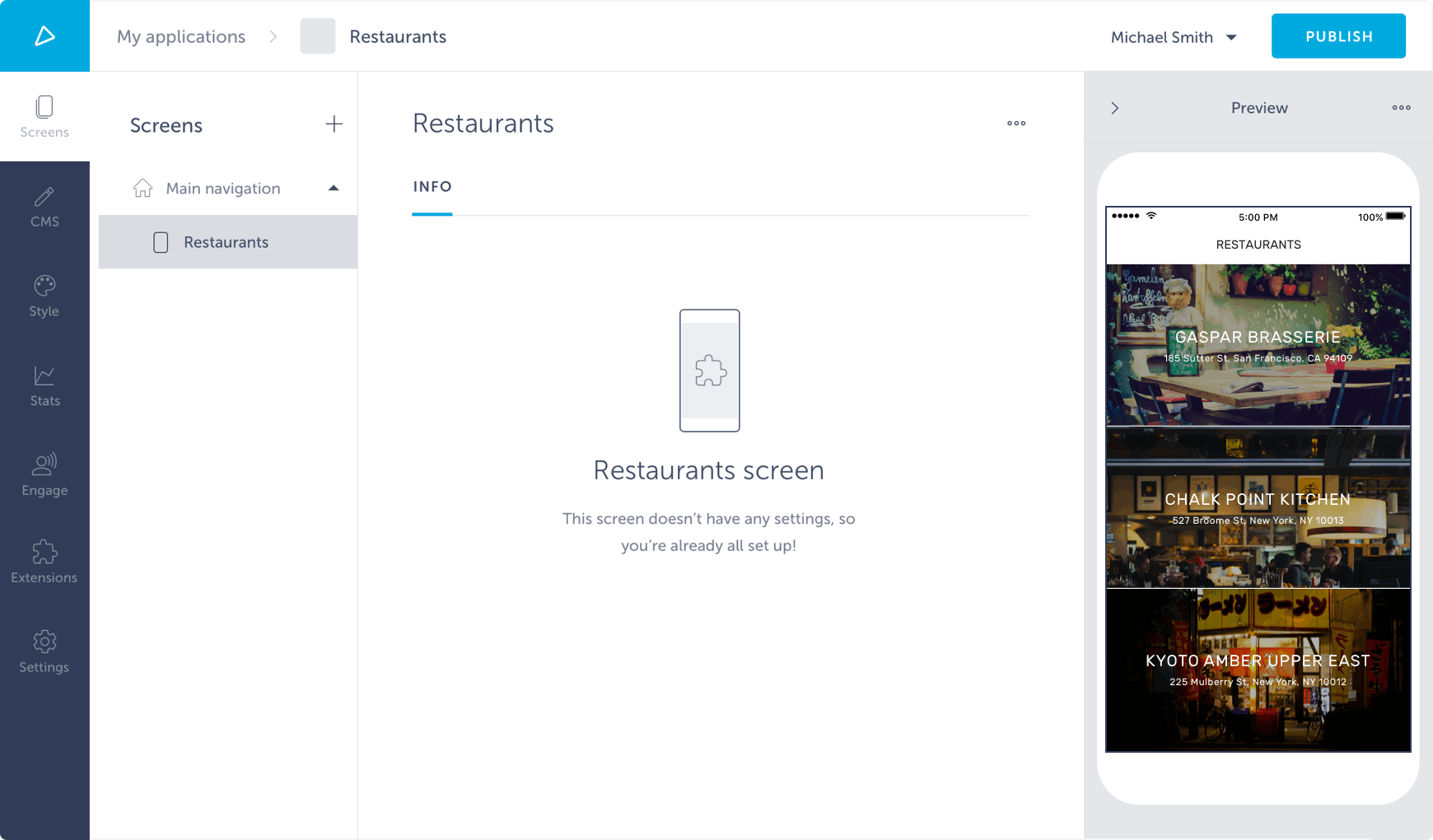
这看起来正是我们想要的。
尝试点击一行。 什么都没发生! 我们希望在单击列表行项时打开详细信息屏幕。
首先,创建详细信息屏幕:
$ shoutem screen add RestaurantDetails
File `app/screens/RestaurantDetails.js` is created.
Screen在extension.json文件中定义。
不要忘记在index.js中导出它。
#file: app/index.js
import RestaurantsList from './screens/RestaurantsList';
import RestaurantDetails from './screens/RestaurantDetails';

export const screens = {
  RestaurantsList,
  RestaurantDetails
};

export const reducer = {};
当触摸列表项时,我们要打开详细信息屏幕。
为此,我们需要来自React Native的TouchableOpacity和Shoutem的navigateTo - Redux动作创建器。 它接受Shoutem的route对象(具有screen和props属性)作为唯一的参数。
为了引用app/index.js中导出的RestaurantDetails屏幕,我们使用app/const.js文件中创建的ext helper函数。
此函数返回绝对名称,例如 developer.restaurants.RestaurantsList,对于作为其第一个参数传递的扩展部分,如果没有传递参数,则为扩展名name。
让我们导入这些东西:
#file: app/screens/RestaurantsList.js
import {
  TouchableOpacity
} from 'react-native';
import { navigateTo } from '@shoutem/core/navigation';
import { ext } from '../const';
要打开一个触摸屏幕,我们需要触发navigateTo。
我们可以通过dispatch直接在屏幕上使用它,但Redux标准的方法是将dispatch和action创建器绑定在mapDispatchToProps函数中,connect 函数的第二个参数。
绑定动作通过props访问,这就是为什么我们需要绑定renderRow动作到正确的this上下文。
#file: app/screens/RestaurantsList.js
import { connect } from 'react-redux';

class RestaurantsList extends Component {
  constructor(props) {
    super(props);

    this.renderRow = this.renderRow.bind(this);
  }
  ...
}

export default connect(
  undefined,
  { navigateTo }
)(RestaurantsList);
实现renderRow函数。
#file: app/screens/RestaurantsList.js
  renderRow(restaurant) {
    const { navigateTo } = this.props;

    return (
      <TouchableOpacity onPress={() => navigateTo({
        screen: ext('RestaurantDetails'),
        props: { restaurant }
      })}>
        <Image styleName="large-banner" source={{ uri: restaurant.image &&
        restaurant.image.url ? restaurant.image.url : undefined }}>
          <Tile>
            <Title>{restaurant.name}</Title>
            <Subtitle>{restaurant.address}</Subtitle>
          </Tile>
        </Image>
      </TouchableOpacity>
    );
  }
这就是你最终在app/screens/RestaurantsList.js该有的东西:
#file: app/screens/RestaurantsList.js
import React, {
  Component
} from 'react';
import {
  TouchableOpacity,
} from 'react-native';
import {
  Image,
  ListView,
  Tile,
  Title,
  Subtitle,
  Overlay,
  Screen
} from '@shoutem/ui';
import { NavigationBar } from '@shoutem/ui/navigation';
import { navigateTo } from '@shoutem/core/navigation';
import { ext } from '../const';
import { connect } from 'react-redux';

class RestaurantsList extends Component {
  constructor(props) {
    super(props);

    this.renderRow = this.renderRow.bind(this);
  }

  getRestaurants() {
    return require('../assets/restaurants.json');
  }

  renderRow(restaurant) {
    const { navigateTo } = this.props;

    return (
      <TouchableOpacity onPress={() => navigateTo({
        screen: ext('RestaurantDetails'),
        props: { restaurant }
      })}>
        <Image styleName="large-banner" source={{ uri: restaurant.image &&
        restaurant.image.url ? restaurant.image.url : undefined }}>
          <Tile>
            <Title>{restaurant.name}</Title>
            <Subtitle>{restaurant.address}</Subtitle>
          </Tile>
        </Image>
      </TouchableOpacity>
    );
  }

  render() {
    return (
      <Screen>
        <NavigationBar title="RESTAURANTS" />
        <ListView
          data={this.getRestaurants()}
          renderRow={restaurant => this.renderRow(restaurant)}
        />
      </Screen>
    );
  }
}

export default connect(
  undefined,
  { navigateTo }
)(RestaurantsList)
到RestaurantDetails屏幕,只需复制以下代码。
我们不会引入任何新的,只是使用一些新的组件。
#file: app/screens/RestaurantDetails.js
import React, {
  Component
} from 'react';
import {
  ScrollView,
} from 'react-native';
import {
  Icon,
  Row,
  Subtitle,
  Text,
  Title,
  View,
  Image,
  Divider,
  Overlay,
  Tile,
} from '@shoutem/ui';

export default class RestaurantDetails extends Component {
  render() {
    const { restaurant } = this.props;

    return (
      <ScrollView style = {{marginTop:-70}}>
        <Image styleName="large-portrait" source={{ uri: restaurant.image &&
        restaurant.image.url ? restaurant.image.url : undefined }}>
          <Overlay styleName="fill-parent">
            <Title>{restaurant.name}</Title>
            <Subtitle>{restaurant.address}</Subtitle>
          </Overlay>
        </Image>

        <Row>
          <Text>{restaurant.description}</Text>
        </Row>

        <Divider styleName="line" />

        <Row>
          <Icon name="laptop" />
          <View styleName="vertical">
            <Subtitle>Visit webpage</Subtitle>
            <Text>{restaurant.url}</Text>
          </View>
          <Icon name="right-arrow" />
        </Row>

        <Divider styleName="line" />

        <Row>
          <Icon name="pin" />
          <View styleName="vertical">
            <Subtitle>Address</Subtitle>
            <Text>{restaurant.address}</Text>
          </View>
          <Icon name="right-arrow" />
        </Row>

        <Divider styleName="line" />

        <Row>
          <Icon name="email" />
          <View styleName="vertical">
            <Subtitle>Email</Subtitle>
            <Text>{restaurant.mail}</Text>
          </View>
        </Row>

        <Divider styleName="line" />
      </ScrollView>
    );
  }
}
我们将跳过实现Web和电子邮件属性的处理,并只渲染它们。
上传扩展:
$ shoutem push
Uploading `Restaurants` extension to Shoutem...
Success!
当您点击列表中的某一行时,会得到:
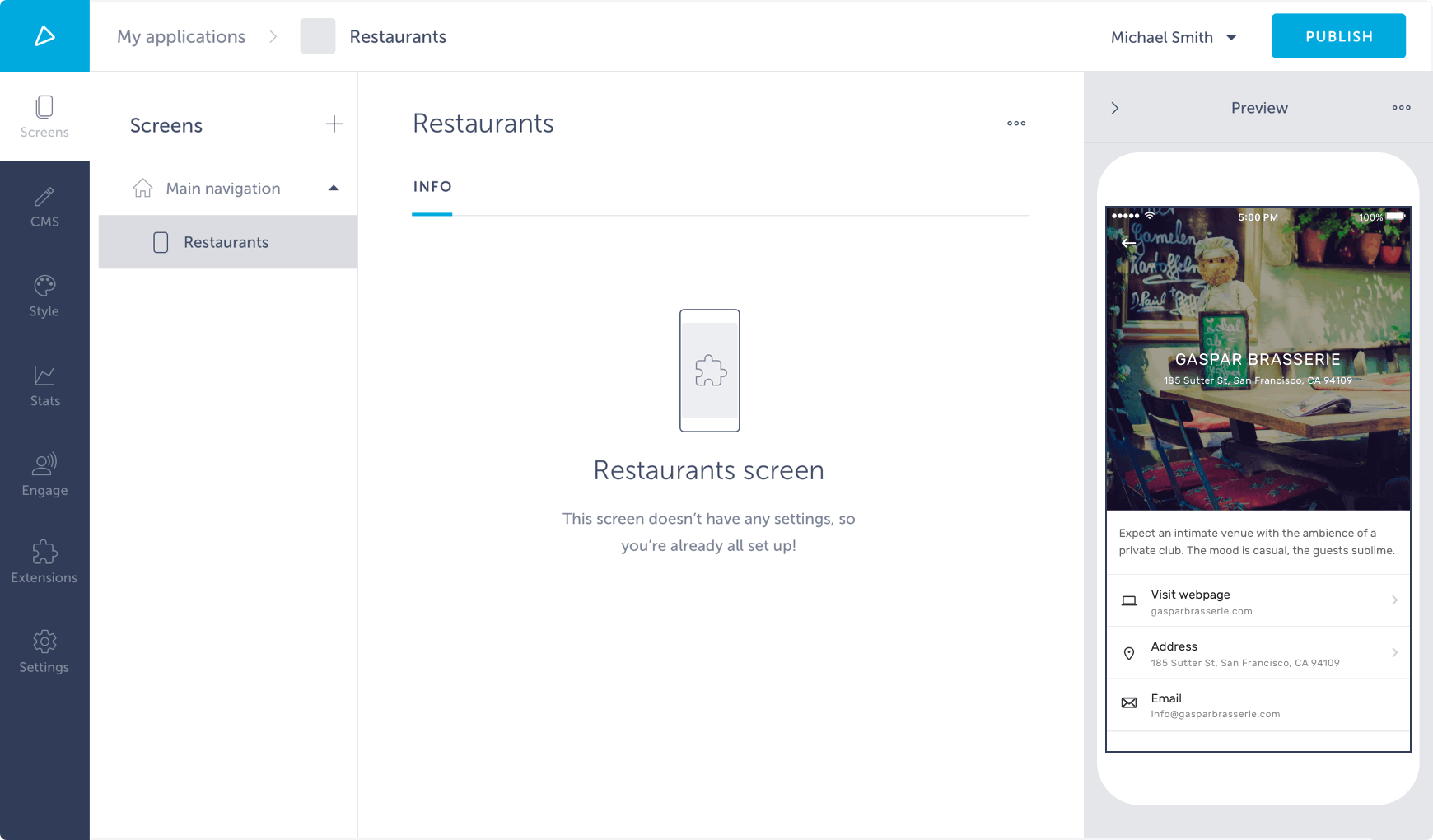
这正是我们想要的! 但是,我们的应用程序正在使用静态数据。 让我们将它连接到Shoutem Cloud Storage。