Stay informed
Subscribe to our newsletter if you'd like to stay informed about Shoutem Extensions and Shoutem UI Toolkit.
Data on the Shoutem Cloud Storage needs to be fetched in the application. First, remove all static files from the extension, so we’re sure that we’re actually fetching data from the Shoutem Cloud Storage, i.e. remove assets folder. Define reducer which will define how the state of the application should be changed when action is dispatched and how the initial state should look like. Create new folder app/reducers with index.js file.
Package @shoutem/redux-io has reducers and actions that communicate with Shoutem Cloud Storage. Import these reducers.
#file: app/reducers/index.js
import { storage, collection } from '@shoutem/redux-io';
Reducer storage retrieves resources in a dictionary while collection stores resources ID’s in an array so that the order is maintained. Make use of Redux’s combineReducers to create one root reducer from more Shoutem reducers.
#file: app/reducers/index.js
import { storage, collection } from '@shoutem/redux-io';
import { combineReducers } from 'redux';
import { ext } from '../const';

export default combineReducers({
  restaurants: storage(ext('Restaurants')),
  allRestaurants: collection(ext('Restaurants'), 'all')
});
We’ve used ext function to get absolute name of schema. This root reducer needs to be exported in app/index.js file:
#file: app/index.js
import reducer from './reducers';
import RestaurantsList from './screens/RestaurantsList';
import RestaurantDetails from './screens/RestaurantDetails';

export const screens = {
  RestaurantsList,
  RestaurantDetails
};

export { reducer };
The only thing left to do is to fetch data from Shoutem Cloud Storage on RestaurantsList screen and to retrieve that data, in form of restaurants, from application’s state. Once screen is mounted, if restaurants are not in the Redux store, we’ll start fetching data with find action creator from @shoutem/redux-io package. Also, import 3 helper functions from that package:
isBusy - gives feedback if data is being fetched,shouldRefresh - knows if data needs to be (re)fetched andgetCollection - combines storage and collection into an array of objects.#file: app/screens/RestaurantsList.js
import {
find,
isBusy,
shouldRefresh,
getCollection
} from '@shoutem/redux-io';
If necessary, fetch data in componentDidMount lifecycle.
#file: app/screens/RestaurantsList.js
class RestaurantsList extends Component {
  componentDidMount() {
    const { find, restaurants } = this.props;
    if (shouldRefresh(restaurants)) {
      find(ext('Restaurants'), 'all', {
          include: 'image',
      });
    }
  }
Implement rendering.
#file: app/screens/RestaurantsList.js
  render() {
    const { restaurants } = this.props;

    return (
      <Screen>
        <NavigationBar title="RESTAURANTS" />
        <ListView
          data={restaurants}
          loading={isBusy(restaurants)}
          renderRow={restaurant => this.renderRow(restaurant, navigateTo)}
        />
      </Screen>
    );
  }
In render method, we’re expecting to get restaurants as an array. In app/reducers/index.js we defined restaurants dictionary that will be fetched through storage and allRestaurants collection that will be fetched through collection reducer. Combine both into an array with getCollection function from @shoutem/redux-io in 1st argument of connect function. In 2nd argument, we’ll bind find action creator.
#file: app/screens/RestaurantsList.js
export default connect(
  (state) => ({
    restaurants: getCollection(state[ext()].allRestaurants, state)
  }),
  { navigateTo, find }
)(RestaurantsList);
This is the final result of RestaurantsList screen that uses both Shoutem UI Toolkit and Shoutem Cloud Storage.
#file: app/screens/RestaurantsList.js
import React, {
  Component
} from 'react';
import {
  TouchableOpacity,
} from 'react-native';
import {
  Image,
  ListView,
  Tile,
  Title,
  Subtitle,
  Overlay,
  Divider,
  Screen
} from '@shoutem/ui';
import { NavigationBar } from '@shoutem/ui/navigation';

import {
  find,
  isBusy,
  shouldRefresh,
  getCollection
} from '@shoutem/redux-io';

import { connect } from 'react-redux';
import { navigateTo } from '@shoutem/core/navigation';
import { ext } from '../const';

class RestaurantsList extends Component {
  constructor(props) {
    super(props);

    this.renderRow = this.renderRow.bind(this);
  }

  componentDidMount() {
    const { find, restaurants } = this.props;
    if (shouldRefresh(restaurants)) {
      find(ext('Restaurants'), 'all', {
          include: 'image',
      });
    }
  }

  renderRow(restaurant) {
    const { navigateTo } = this.props;

    return (
      <TouchableOpacity onPress={() => navigateTo({
        screen: ext('RestaurantDetails'),
        props: { restaurant }
      })}>
        <Image styleName="large-banner" source={{ uri: restaurant.image &&
        restaurant.image.url ? restaurant.image.url : undefined }}>
          <Tile>
            <Title>{restaurant.name}</Title>
            <Subtitle>{restaurant.address}</Subtitle>
          </Tile>
        </Image>
      </TouchableOpacity>
    );
  }

  render() {
    const { restaurants } = this.props;

    return (
      <Screen>
        <NavigationBar title="RESTAURANTS" />
        <ListView
          data={restaurants}
          status={isBusy(restaurants)}
          renderRow={restaurant => this.renderRow(restaurant, navigateTo)}
        />
      </Screen>
    );
  }
}

export default connect(
  (state) => ({
    restaurants: getCollection(state[ext()].allRestaurants, state)
  }),
  { navigateTo, find }
)(RestaurantsList);
Let’s check how it works:
$ shoutem push
Uploading `Restaurants` extension to Shoutem...
Success!
Everything should work as charm!
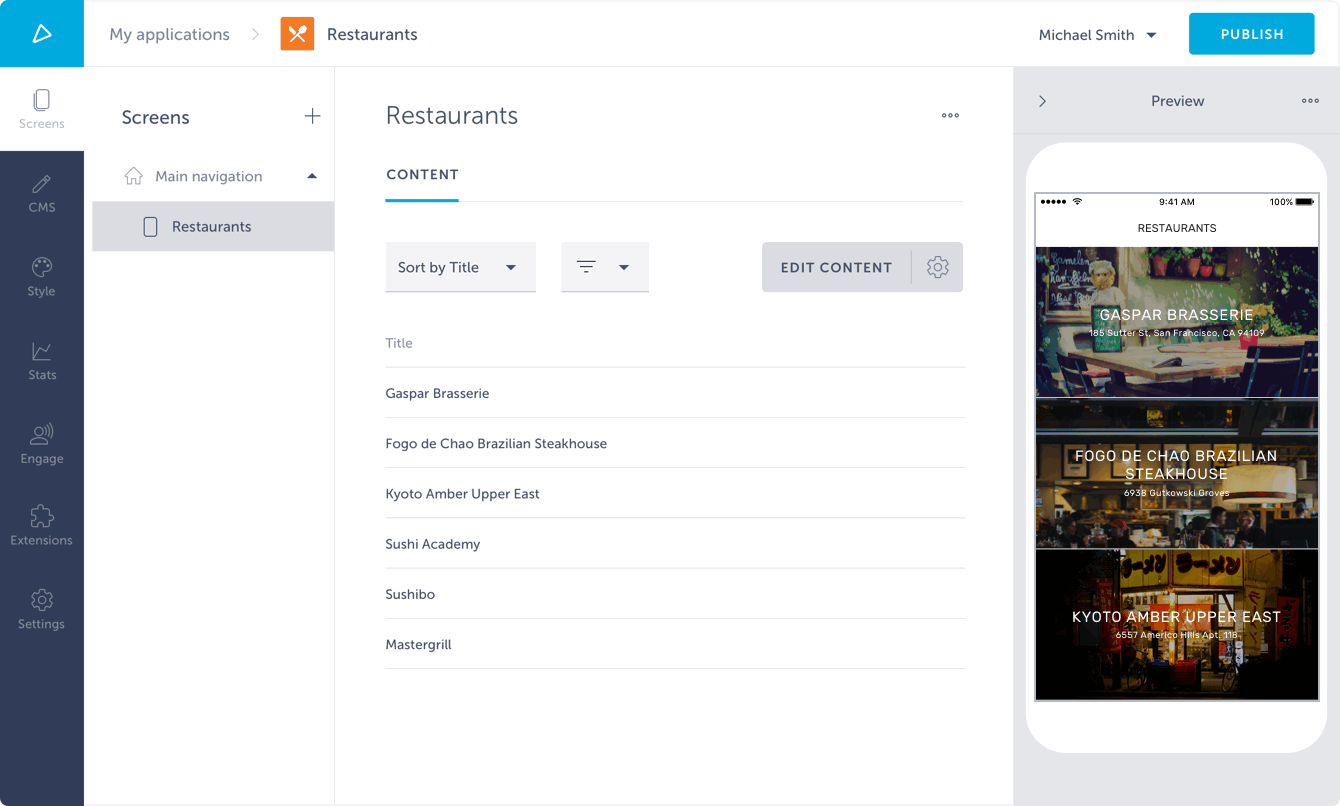
This is it! You’ve done it. You’ve just made your first extension using powerful services as Shoutem UI Toolkit and Shoutem Cloud Storage. Well Done!