Stay informed
Subscribe to our newsletter if you'd like to stay informed about Shoutem Extensions and Shoutem UI Toolkit.
Alternative layouts are very useful if you want let application owners to choose which layout they want to use in their app (e.g. for Political news they want to use layout with smaller images, but for Fashion they want to show large images). Additionally, by adding a little bit more logic, you can easily set A/B test where you test performance of one layout against another.
We’ll continue making an alternative layout on the Restaurants extension that is covered in Getting started tutorial. Int that tutorial we’ve created the app with onle list screen and one details screen and connected it to Shoutem CMS.
Now let’s add one additional screen that will represent an alternative layout that will feature a list with smaller images as shown on the image below:
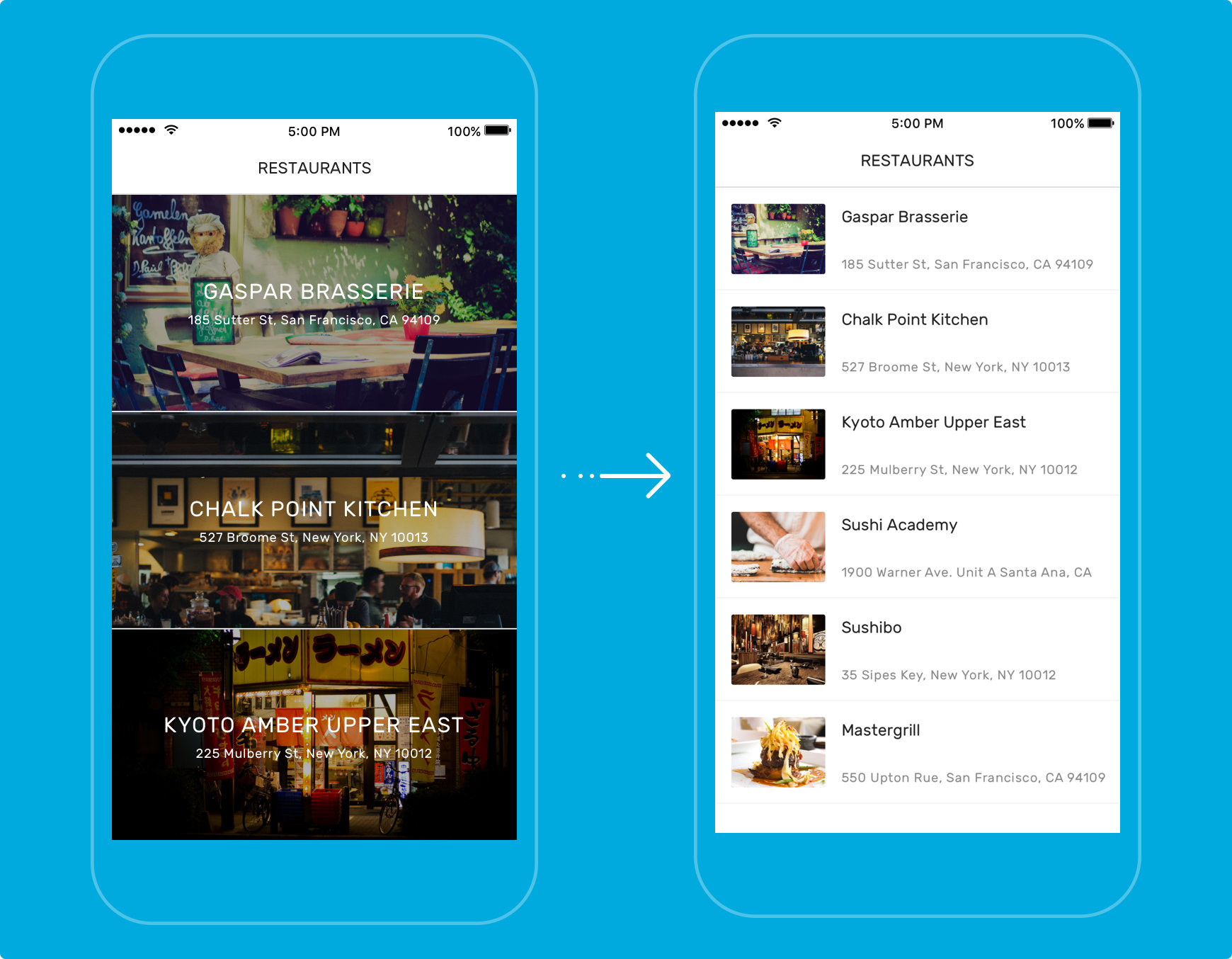
Let’s create a new screen:
$ shoutem screen add RestaurantsSmallList
Enter screen information:
Title: Small list of restaurants

File `app/screens/RestaurantsSmallList.js` is successfully created.
Check your extension.json now. New screen is added.
#file: extension.json
{
  "name": "restaurants",
  "title": "Restaurants",
  "version": "0.0.1",
  "description": "Show the cool restaurants!",
  "shortcuts": [
     {...}
  ],
  "screens": [{
    "name": "RestaurantsList",
    "Title":"List",
    "navigatesTo": [
      "DEVELOPER.restaurants.RestaurantsDetails"
    ]
  },
  {
    "name":"RestaurantsDetails",
    "title":"Details"
  },
  {
    "name":"RestaurantsSmallList"
  }
  ],
  "dataSchemas": [
    {
      "name": "Restaurants",
      "path": "server/data-schemas/Restaurants.json"
    }
  ]
}
In order to get a list item with the small image we can extend RestaurantsList and override only the renderRow method.
You can c&p code below to RestaurantsSmallList.
#file: app/screens/RestaurantSmallList.js
import React, {
  Component
} from 'react';
import {
  TouchableOpacity
} from 'react-native';
import {
  Image,
  Row,
  View,
  Subtitle,
  Caption,
  Divider,
  Icon
} from '@shoutem/ui';
import {
  find,
  getCollection
} from '@shoutem/redux-io';
import { connect } from 'react-redux';
import { navigateTo } from '@shoutem/core/navigation';
import { bindActionCreators } from 'redux';
import { ext } from '../const';

import {
	RestaurantsList
} from './RestaurantsList';

class RestaurantsSmallList extends RestaurantsList {

  //only overriding the renderRow function
  renderRow(restaurant) {
    const { navigateTo } = this.props;

    return (
      <TouchableOpacity onPress={() => navigateTo({
          screen: ext('RestaurantDetails'),
          props: { restaurant }
        })}>
        <Row>
          <Image style={{width:90, height:70}} source={{ uri: restaurant.image && restaurant.image.url }} />
          <View styleName="vertical">
              <Subtitle>{restaurant.name}</Subtitle>
              <Caption>{restaurant.address}</Caption>
          </View>
          <Icon name="right-arrow" styleName="disclosure"/>
        </Row>
        <Divider styleName="line" />
      </TouchableOpacity>
    );
  }
}

export default connect(
    (state) => ({
    restaurants: getCollection(state[ext()].allRestaurants, state)
  }),
     (dispatch) => bindActionCreators({ navigateTo, find }, dispatch)
)(RestaurantsSmallList);
From the RestaurantsList.js we need to export class RestaurantsList.
#file: app/screens/RestaurantsList.js
...
export class RestaurantsList extends Component {
    componentDidMount() {...
Last thing we need to do is export the RestaurantsSmallList in index.js.
#file: app/index.js
// Constants `screens`, `actions` and `reducer` are exported via named export
// It is important to use those exact names

import reducer from './reducers';
import RestaurantsList from './screens/RestaurantsList.js';
import RestaurantDetails from './screens/RestaurantDetails';
import RestaurantsSmallList from './screens/RestaurantsSmallList';

export const screens = {
  RestaurantsList,
  RestaurantDetails,
  RestaurantsSmallList
};

export {reducer};
In order for Shoutem Builder to know that there is an alternative screen to RestaurantsList we need to extend that screen in Extensions.json as well. It behaves the same way as extend in javascript does, inherits all properties from origin and overrides ones that we explicitly define.
One more thing we’re missing are images that will represent these screens. You can download them here and add them to your server/assets/screens folder.
#file: extension.json
...
"screens": [{
    "name": "RestaurantsList",
    "title":"List",
    "image":"./server/assets/screens/restaurants-list.png",
    "navigatesTo": [
      "DEVELOPER.restaurants.RestaurantsDetails"
    ]
  },
  {
    "name":"RestaurantsDetails"
  },
    {
    "name":"RestaurantsSmallList",
    "title":"Small list",
    "extends":"DEVELOPER.restaurants.RestaurantsList",
    "image":"./server/assets/screens/restaurants-smalllist.png"
  }
],
...
Once we have this set up, we need to add layout admin page to the list of admin pages. Add it to extension.json.
#file: extension.json
  "shortcuts": [{
      "title": "Restaurants",
      "description": "Allow users to browse through list of restaurants",
      "name": "openRestaurantsList",
      "screen": "DEVELOPER.restaurants.openRestaurantsList",
      "adminPages": [{
        "page": "shoutem.admin.CmsPage",
        "title": "Content",
        "parameters": {
          "schema": "DEVELOPER.restaurants.Restaurants"
        }
      }, {
          "page":"shoutem.admin.LayoutPage",
          "title": "Layout"
      }]
  }],
Now, push the changes and reload page in Shoutem builder to see the Layout tab.
$ shoutem push
Uploading `Restaurants` extension to Shoutem...
Success!
Layout tab has appeared any by selecting Small ist and hitting on preview you should be able to see the new screen.

Apart from extensions, Shoutem has other products ready for boosting your mobile development. Check them out:
Good coding!